
Help with links, orders and the words around them
Where to take a problem, a glossary written for link-based buying, and answers to the questions most often sent in.
Matching each problem to whoever can fix it
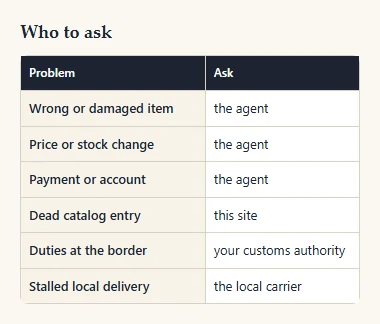
If you need help, the first question is whose problem it is. Anything about the product, the listing or the seller goes to the agent you ordered through, which deals with the seller for you. Orders, payments and warehouse questions also go to the agent; for CNFans during the maintenance, that means the support email on its notice.
For import charges, use the relevant customs authority or collecting carrier. For local delivery events, contact the carrier shown in tracking and keep the agent informed if a claim is needed. This guide cannot access the order; catalogue revisions appear on Updates.
Sending a problem to the right place first saves days. A catalog error sent to an agent, or a warehouse problem sent to us, has to be forwarded before anyone can start on it.
Glossary for link-based buying
These are the terms used across this site, defined the way they matter when you buy from a link. Where a term has a common abbreviation, it is given in the definition.
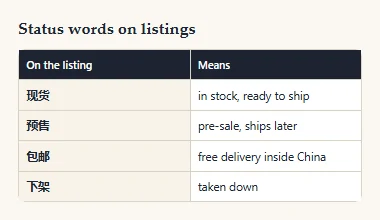
Listings themselves are often in Chinese. Beyond the option words on the sellers and items page, a few status words turn up often enough to be worth recognizing on sight.
If a word you meet is missing, send it in. The glossary grows from the terms readers actually trip over, not from a list made in advance.
- Agent
- The go-between that orders from Chinese shops for you, takes delivery of the parcel at its own warehouse and sends it on abroad. CNFans is one.
- Catalog entry
- One product card in this catalog: a photo, a category, the price shown and a link to one listing.
- Item number
- The digits that identify a listing on its platform. Ten digits on the Weidian listings in our sample.
- Listing
- The seller's own page for a product, with photos, the option menu, prices and stock.
- Option
- One choice on the listing's menu, such as a color, print letter or size. Some sites call it a SKU.
- Plain link
- A listing address reduced to the platform address, the key and the item number.
- Share text
- The message an app produces when you tap share: usually a platform name, a short link and the title.
- Short link
- A brief address that redirects to the full listing link and hides the item number.
- Tracking tag
- An extra part of a link, such as utm_source or spm, that records where a click came from.
- Invite code
- A code in a link that credits whoever shared it. It never changes the product.
- Order form
- The agent's page where a pasted link becomes an order with your option, size and quantity.
- Remark
- The free-text field on an order form for anything the option menu cannot say.
- Warehouse photos
- Pictures taken when your item reaches the agent's warehouse; also called QC photos.
- Consolidation
- Packing items from several links into one parcel so they ship together.
- Volumetric weight
- Size turned into kilograms; lines charge it whenever it beats the scale reading.
- Shipping line
- A route and carrier arrangement from the warehouse to your country, with its own prices and limits.
- Duties
- Charges your country may apply to imported goods, paid to customs or the carrier.
Questions people send about links
These are the questions most frequently asked about using catalog links with an agent. Short answers, each naming the fuller page to read next.
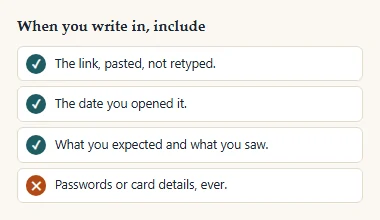
For a question about a link, save its full address, the exact option and the date. Those details distinguish a broken URL from an unavailable option. Use the official agent channel for a paid order.
Answers here are kept short on purpose. Each one points to the page that explains the reasoning, so you can go deeper only where you need to.
Is ordering at CNFans possible at the moment?
As of October 20, 2026, no. Every address on cnfans.com showed a maintenance page that day. Listing links keep working, so your notes stay useful for when ordering reopens.
Do I need the catalog link or the listing link?
Either one works, because both carry the same item number. Most order forms want the listing link; the link reader turns a catalog address into one.
Why does my pasted link show a different product?
Usually a digit changed somewhere: retyped from a picture, cut off in a message, or edited by accident. Paste a fresh copy from the original source and compare the first photo.
Is it safe to remove the invite code from a link?
Yes. Invite codes and tracking tags do not choose the product. Removing them only stops a referral from being credited.
The link opens but shows no photos or price. Is it broken?
Treat it as dead or wrong. In our tests an invented Weidian number still loaded a page, so loading is not proof the listing exists.
Where do I put my size?
In the option menu on the order form, chosen by its exact name. If the menu cannot express it, add a short remark, and keep the same text in your note.
My order now costs more than the listing showed. Why?
Listings change, and some sellers price options differently. Compare your note with the listing and ask the agent which option it bought before agreeing to pay more.
Can this site check whether a listing is still live?
Not automatically. The link reader works offline and fetches nothing. Open the listing yourself on the day you order.
Who do I contact about a wrong item?
The agent you ordered through; it deals with the seller. For CNFans during the maintenance, the address printed on the notice is [email protected].
How do I report a dead entry in this catalog?
No verified editorial inbox is currently published here. Site changes are dated on Updates. Keep the entry URL and the seller’s current option details when information differs.