Each catalog category, and the note to write before copying its links
Clothing, shoes, bags, accessories, fragrance and electronics. Pick a category, open an entry, and take its listing link with you.
Category cards, each with a link note
Each card opens that category of the catalog. The note under it is what we would write down before copying a link from there.
 Low and high topsShoe size is always an option, never part of the link. Some listings use European sizes, some use foot length.Category
 Shells, puffers and bombersJackets are where parcel weight jumps. Note the size option and look for a chest width in centimeters before the link leaves the catalog.Category
 Hooded sweatsColorways are often one listing with many options. Copy the option name exactly, including any letter or number in front of it.Category
 TeesPrints may be lettered A, B, C on the listing. Match the letter to the picture, then write both down.Category
 DenimDenim listings often give the waist in centimeters. Keep the chart image with your note, not just the letter size.Category
 Track and sweat pantsWaist and length can be folded into one size label. Look for the size chart image on the listing.Category
 Womenswear, as a searchThis tile is a search, not a category, so results mix many garments. Add your own word, such as dress or blouse, to narrow it.Search results
 Football shirtsSeason, home or away, and any printing are separate choices. Each one has to be written into the order.Category
 Carry bagsHardware color and strap options can sit under one number. Ask to see the hardware in the warehouse photos.Category
 Caps and beaniesUsually one size or an adjustable strap. Light enough to ride along in a bigger parcel.Category
 BeltsLength is the option to watch, and buckle styles may be lettered. Measure a belt you already own first.Category
 Sunglasses and framesLens tint and frame color are usually separate options. Fragile, so think about packing before it ships.Category
 FragranceLiquids limit which shipping lines will carry a parcel. Check that before ordering, not at the warehouse.Category
 JewelrySmall, light and easy to mix up. Ask for a photo beside a ruler if the size matters to you.Category
 WristwatchesAsk for the dial running in the warehouse photos, and check the strap length option.Category
 ElectronicsBatteries and chargers narrow the shipping lines that accept a parcel, and plug types differ by country.Category
Narrowing a category down to one item number
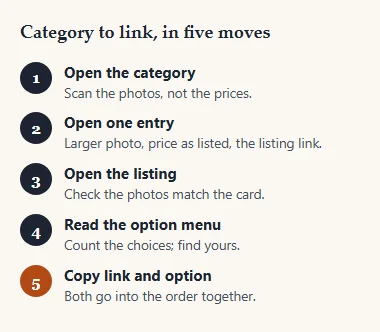
A category page is a wall of photos. The work is narrowing it to one entry you are sure about, and then to the listing behind it. Open an entry rather than judging from the thumbnail: the entry shows the photo larger, the price the seller listed, and the link to the listing itself.
On the listing, find the option menu before anything else. A single photo on the catalog card can stand for several colors, prints or sizes, and the link points at all of them at once. Your choice only exists once you write it down, which is why each card on this page ends with a note about what to record.
Keep the catalog tab open while you read the listing. Switching back and forth between the card photo and the listing photos is the fastest way to notice that a seller's first picture shows a different color from the one the card was made from.
Two photos of one product can carry two different numbers
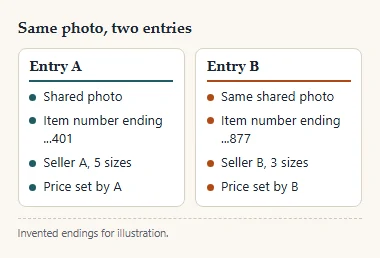
The same garment can appear in more than one listing, often with identical photos, because sellers reuse pictures freely. The catalog files each listing as its own entry. If two entries look the same, they are still two different item numbers, two sellers and possibly two prices.
An order follows the number, not the picture. Pick between look-alike entries on what the listings say: the option menu, the size chart, the shop's other items. Then keep the number of the one you chose and nothing else, so the photo of the other cannot creep back into your notes.
If you cannot choose, look at the size information. A listing that gives measurements in centimeters for each size is easier to order from correctly than one that offers letters alone, whatever the photos look like.
Womenswear works as a search
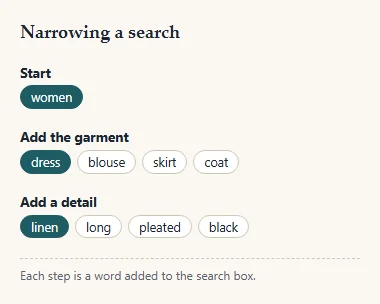
Most cards on this page open a category. The womenswear card is different: it opens search results for the word women, because the catalog files products by what they are rather than who wears them. Results mix coats, shirts, trousers and more.
Narrow it the way you would any search: add the garment, then a detail. Women dress, women blouse and women skirt each return far tighter sets. The search box on the home page works the same way and accepts plain English words.
The same trick helps in other categories when a page is too broad. A garment word plus a material or a color usually brings a long list down to something you can scan in a minute, and each result still opens a single entry with its own link.
Keeping track of what you picked
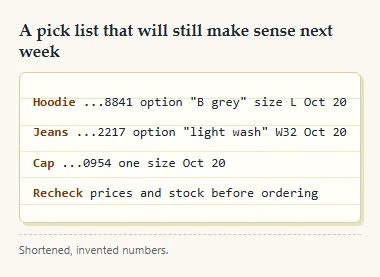
Browsing several categories in one evening produces a pile of tabs. Before you close them, note each pick as a number, the option you want, and the date. A list of photos tells you nothing a week later; a list of numbers can be reopened, rechecked and pasted.
The link reader does this for one link at a time and writes the note for you. Paste the entry address or the listing link; either one carries the same number.
Dates matter more than they seem. A pick saved today and ordered next month may have a new price or be sold out in your size, and the date on your note tells you how much rechecking it needs before it goes into an order.