Warehouse photos, the inspection leg of the relay
What the photos are for, how to check them against the link you ordered, and what to do when they disagree with the listing.
The point of QC photos
QC photos are pictures the warehouse takes of your item when it arrives, before it is stored and well ahead of shipping. The letters mean quality check, but the photos do something more basic first: they prove which item arrived. The archived CNFans home page put this stage second in a three-step strip, between placing the order and international shipping.
They are the one close look you get at the physical item while it is still in China, where swapping or returning it is at least possible. After it ships, the seller is out of reach.
How many photos are taken and whether extras cost anything depends on the agent. Those terms for CNFans sat in help articles that were never captured, so we cannot state them here.
QC pictures beside your carry note
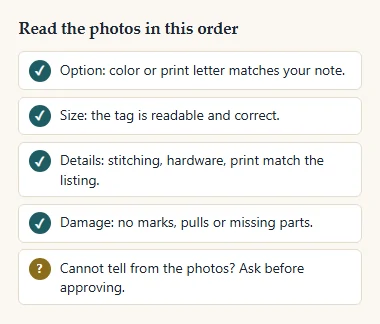
This is how to check QC photos without skipping a step. Open two things side by side: your carry note and the listing itself, not the catalog card. Then go through the photos in a fixed order. Option first: the color or print letter you chose. Size next: the tag or label, readable in at least one picture. Then details that the listing photos show clearly, such as stitching, hardware, prints or closures.
Last, look for damage: marks, pulls, missing parts, a crushed box if the box matters to you. Only once all four pass is approving the right call. If one cannot be judged from the photos, ask.
Doing it in the same order every time matters more than doing it slowly. A fixed order means you never skip the size tag because the color looked right.
Measurements, colors and screens
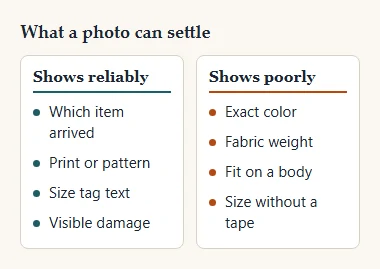
Some things a photo shows well: which item it is, the print, the tag, visible damage. Others it shows badly. Color shifts under warehouse lighting and again on your screen, so judge color against the listing photos as a rough match, not an exact one.
Size is better settled by a measurement than by eye. A flat chest width or a waist measured across, taken with a tape in the photo, can be compared with the listing's size chart directly.
When color really matters, ask for the item photographed beside a white sheet of paper. It gives you a reference for how the lighting shifts everything else in the picture.
A photo that contradicts the listing
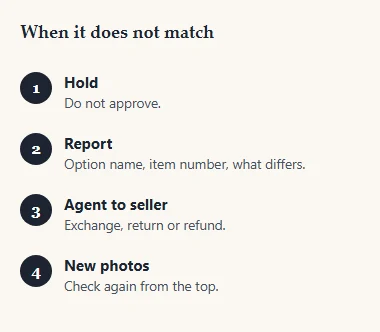
If the item is the wrong color, the wrong print letter, the wrong size or damaged, do not approve it to keep things moving. Tell the agent what is wrong and point to the option name and item number in your note. The agent then takes it up with the seller: an exchange, a return, or a partial refund.
What is possible comes down to the seller's willingness and the agent's own rules, and CNFans' return terms could not be read during the maintenance. Raise it before the item leaves the warehouse; afterwards, most options are gone.
Keep your messages factual and tied to the listing: the option you chose, what the photo shows instead, and which listing photo shows what you expected. That gives the agent something it can forward to the seller as it is.
Requests for extra pictures and tape readings
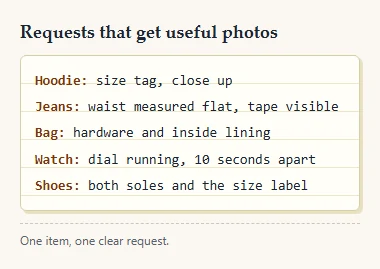
Make requests specific and short, one item at a time. A photo of the size tag, a chest width laid flat with a tape, the hardware close up, a watch dial running, the inside of a bag: each is a single clear picture someone can take in a minute.
Vague requests such as better photos tend to come back as more of the same. Whether extra photos cost anything at CNFans is not stated in the archived pages we have.
Ask once per item and wait for the reply before asking again. A clear single request is easier for warehouse staff to handle than a list of follow-ups arriving one after another.
The right URL can still lead to the wrong option
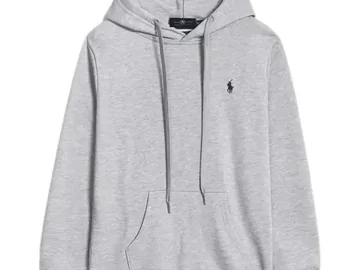
This seller cover shows a grey pullover hoodie, dark drawcords, a front pocket and a small chest mark. It helps identify the intended appearance. It contains no readable size label and is not a photo of the item delivered to a warehouse.
- Match the listing number. That establishes which product menu the order referred to.
- Match the option. Compare the saved colour and size selection with the arrival label. Matching the URL alone does not complete this check.
- Inspect the received piece. Ask for the angle that reveals the pocket, cuff or seam you are concerned about. Do not infer unseen construction from this cover.
Send a mismatch as a short record: listing number, ordered option, visible arrival difference and requested action. For example, “Same listing number, but the size label is S instead of the ordered M; please confirm before packing.” The agent can then check the purchase record without guessing from a photo.